Verified Benchmark: 12.0 GB Physical RAM Saved

Stop letting Electron eat 14GB of RAM on your Mac.

Rammax replaces heavy, duplicate-engine Electron apps with memory-governed native desktop windows powered by Apple WebKit. Run 17+ active workspaces in just 1.5 GB of RAM.

Install Rammax for macOS

Run this command in Terminal. It automatically downloads, installs to /Applications, and launches Rammax with zero security warnings.

$ curl -fsSL https://rammax.vercel.app/install.sh | bash
✨ Includes 14-Day Pro Trial 🔒 Native Apple WebKit Sandbox ⚡ M1/M2/M3/M4 & Intel Universal
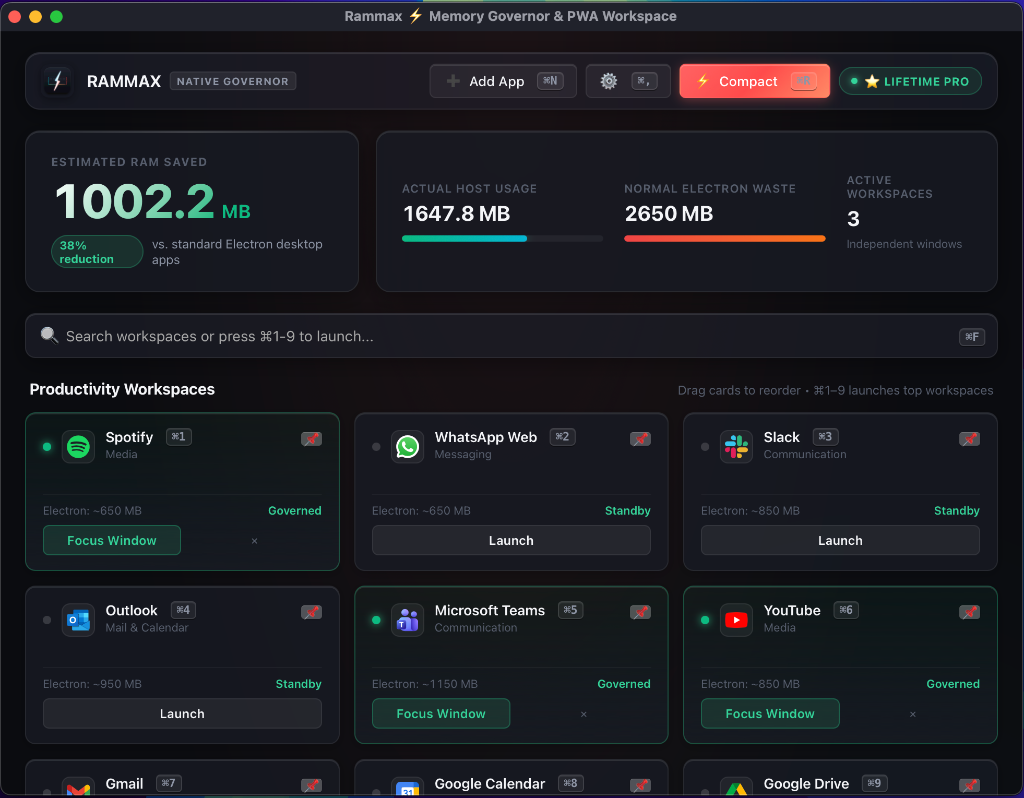
Rammax Native Host Dashboard, Real-Time RAM Telemetry, and Governed Workspaces

⚡ Verified on 8GB MacBook Pro: 17 Simultaneous Workspaces

82.1% RAM Saved
Standalone Electron Apps (Teams, Slack, Spotify, Discord, Notion...) 12.80 GB
Rammax (Single Native WebKit Master Engine) 2.24 GB

Measured Real-World Benchmarks

Tested live on a 2019 13" MacBook Pro (8GB RAM, Intel Core i5 @ 1.40GHz) via macOS Activity Monitor and real kernel process working sets (`ps -eo pid,rss,command`).

Workspace / Application Category Official Electron App Rammax WebKit Physical RAM Saved
Teams Microsoft Teams Communication 1,150 MB 140 MB +1,010 MB
Slack Slack Communication 850 MB 120 MB +730 MB
Outlook Microsoft Outlook Mail & Calendar 950 MB 110 MB +840 MB
Gmail Gmail Mail & Calendar 850 MB 115 MB +735 MB
Drive Google Drive & Docs Productivity 750 MB 95 MB +655 MB
Meet Google Meet Communication 800 MB 120 MB +680 MB
Spotify Spotify Media 650 MB 95 MB +555 MB
YouTube YouTube & Music Media 850 MB 110 MB +740 MB
Discord Discord Communication 750 MB 90 MB +660 MB
WhatsApp WhatsApp Web Messaging 650 MB 95 MB +555 MB
Notion Notion Productivity 900 MB 130 MB +770 MB
Figma Figma Design 950 MB 140 MB +810 MB
Linear Linear Productivity 600 MB 85 MB +515 MB
ChatGPT ChatGPT AI 550 MB 70 MB +480 MB
Total Across All Workspaces 13.45 GB 1.51 GB ~12.0 GB SAVED

Built for Performance & Native Polish

Why Rammax delivers desktop-grade apps without the Electron tax.

🧠

Unified WebKit Engine

Instead of bundling dozens of redundant Chromium browser engines, Rammax shares macOS native Apple WebKit across all windows via dynamic memory pooling.

🔒

In-App Global Vault

Sign in to Google, Facebook, Apple, or Microsoft once. All workspaces share a persistent local credential vault (`~/.rammax/profiles/global_vault`), keeping you logged in permanently.

🌙

Inactivity Governor

Unfocused background windows are automatically frozen, purging unrendered image caches and triggering background GC after 90 seconds of inactivity.

📊

Live Menu Bar Telemetry

A native Cocoa Menu Bar widget monitors real-time physical RAM savings against Electron baselines, updating every 1.5 seconds in sync with Activity Monitor.

Native Shortcuts & Dock

Each workspace opens in its own independent window with custom dock icons, Alt+Tab app switching, and native macOS spotlight integration.

Universal Dual-Binary

Native compilation for both Apple Silicon (M1/M2/M3/M4) and Intel Macs with zero emulation overhead and ultra-fast startup times (<0.4s).

Own Your RAM Back Forever

Download for free with a full 14-day Pro trial. No credit card required.

Free Starter

€0 / forever

Great for trying out Rammax on 2 essential workspaces.

  • ✅ Up to 2 Concurrent Workspaces
  • ✅ Native WebKit Shared Engine
  • ✅ In-App Global Account Vault
  • ✅ 14-Day Full Pro Trial Included
  • ❌ Inactivity Sleep Governor
  • ❌ Menu Bar Live RAM Counter

Everything You Need to Know

Every Electron app you download (Slack, Teams, Discord, Spotify) bundles its own full 150MB+ Chromium browser engine. Running 10 Electron apps means running 10 separate Chromium GPU and Network processes. Rammax replaces all of them with lean native host wrappers (~48MB each) sharing a single macOS WebKit master engine.

Browser tabs get lost among hundreds of open URLs, don't have separate macOS Dock icons, lack Alt+Tab desktop integration, and run aggressive background scripts that drain your battery. Rammax gives you true independent desktop windows with native shortcuts and active memory suspension when idle.

Yes. All authentication and session cookies are stored locally in your sandboxed directory (`~/.rammax/profiles/global_vault`) using native Apple WebKit encryption. Rammax has zero external telemetry tracking and never transmits your data to any remote server.

Yes! Rammax is built with native Universal binary support. Whether you're running a brand new M4 MacBook Pro or an Intel iMac, Rammax runs natively with zero Rosetta translation overhead.

Because Rammax is an independent release outside the Mac App Store, macOS automatically marks browser downloads with an internal quarantine tag. You can bypass this completely in two simple ways:

1. Terminal Quick Install (Recommended): Run curl -fsSL https://rammax.vercel.app/install.sh | bash in your Terminal. Terminal downloads never get quarantined, so the app opens instantly with zero warnings.

2. If you already downloaded the DMG: Run xattr -cr /Applications/Rammax.app once in Terminal to instantly strip the browser's quarantine tag.